

MagPlaySID v1.35
Release date:
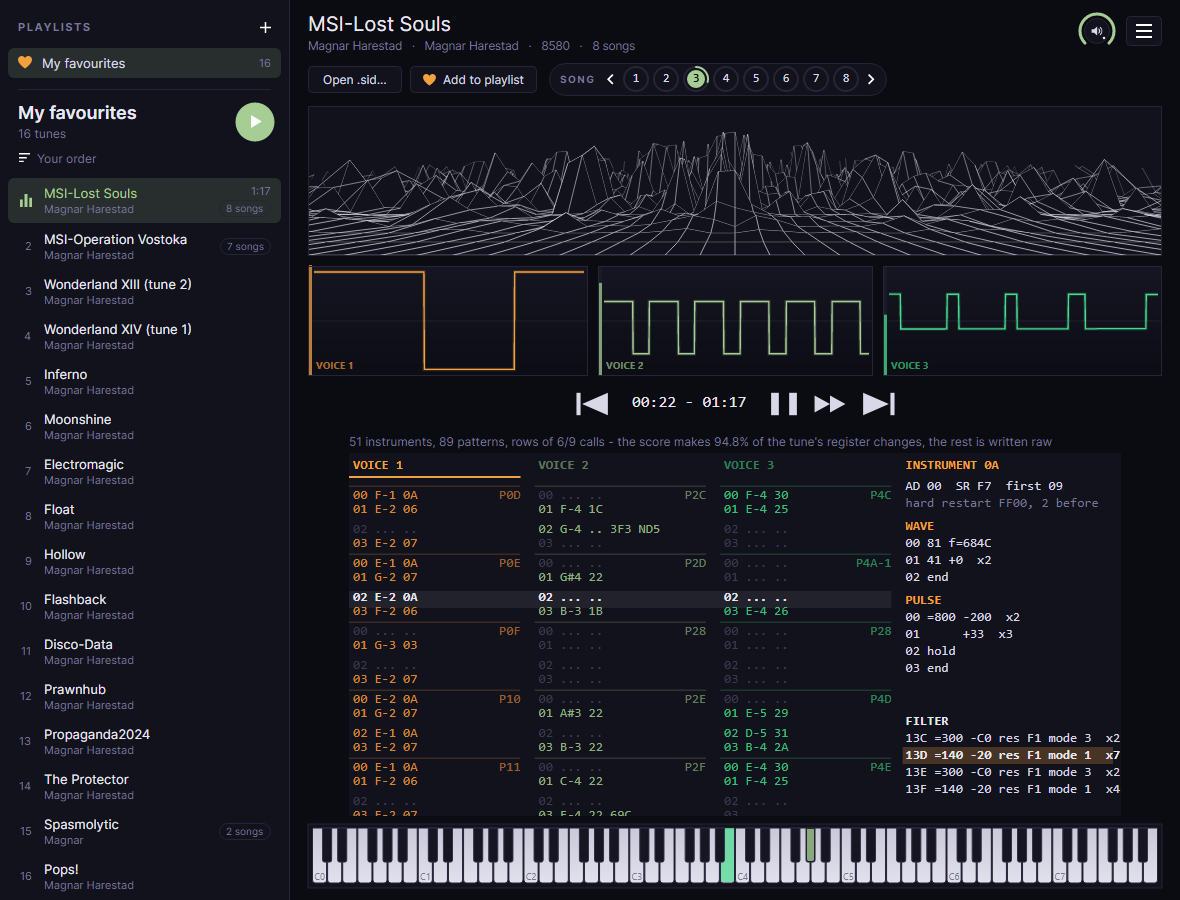
A player for Commodore 64 music that shows how a tune is built. Drop any .sid on it:
it plays on an emulated C64, and you see it as a tracker would - its notes, instruments and effects
in rows that scroll with the music. Drop a whole folder and it becomes a playlist; keep the tunes
you love in playlists of your own.
Also for macOS · Apple Silicon macOS · Intel Linux · x64 release notes opening it on a Mac
What it does
Any tune, played as the C64 plays it, and read back as a score.
Any .sid
PSID and RSID, PAL and NTSC, played on the raster or a CIA timer, once a frame or many times. The tune's own 6502 code runs on an emulated C64 - its timers, interrupts and memory banking - and every write reaches the SID on the cycle it was made.
Digis
Samples streamed from an NMI play as they are written, thousands of times a second - the drums and voices of ThcMOD and LMan's tunes, which a player that calls a tune once a frame never hears. A digi gets a scope of its own beside the voices', and a column in the rows marking each sample as it starts.
Transcribed as you listen
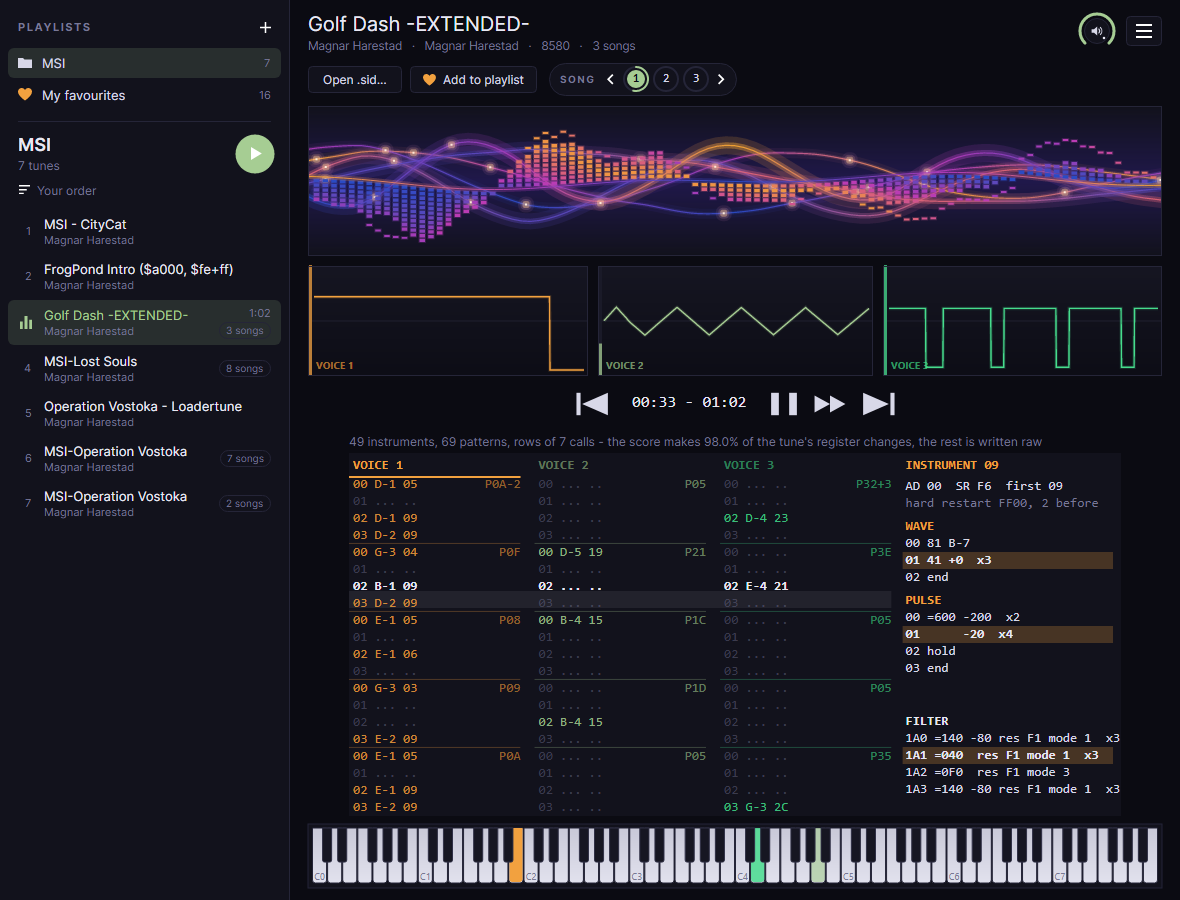
The tune becomes a score: notes on its own row grid, instruments with their wave and pulse programs, the filter, patterns and order lists. The first half minute is ready in a moment, and the whole tune soon after takes over below what is on screen, so the rows you can see never change - with its length, measured on the C64: the tune's memory coming round again proves it loops, and its notes say how much of that is one pass of the music - even when a player's tempo slips a call from pass to pass or its drums play at random - so the clock says how long it plays before it repeats; for a tune that fades out and plays on in silence, or stops the C64 at its end, when it has gone quiet. Against HVSC's own list of song lengths, it agrees for more than four songs in five.
Rows that scroll
Each voice's rows - note, instrument, effects - go past as they sound. Click a voice to see its instrument: envelope, hard restart, and the wave, pulse and filter programs, the step sounding lit.
A piano
Eight octaves along the bottom, each voice's key lit in its colour as loud as its envelope - an arpeggio, a slide or a drum shows as it plays.
2SID and 3SID
Tunes for two or three SID chips play on all of them, each the model its header names, with a scope and score columns for every voice.
Sheet music and text
Export notes in the menu saves the song playing as the rows read it. As sheet music: a PDF with a staff for each voice, its clef chosen line by line, the notes, rests, ties, sharps and naturals in bars of 4/4, and the tempo. As text: each voice's notes, instruments and effects with their bar, beat and time.
Save the sound
Export sound in the menu saves the song playing as a file to play anywhere: WAV, FLAC, lossless and a good deal smaller, or MP3 at 320 kbit/s. It is played again on a C64 of its own, many times faster than it plays, for its length - fading out at the end when it loops - with the voices you have muted left out, and its title, composer and year written in the file.
Drop and play
Drag a .sid from the desktop onto the window, open one, or name it on the command line. MagPlaySID opens where you left it: the playlist and the tune you last played. Space pauses, and the rows stop with the music; in a playlist, the arrow keys go to the tune before or after.
Playlists
Drop a folder of .sid files - or several tunes - on the window and it becomes a playlist down the left, played one tune after another, each moving on once it has played its length; Open folder as playlist in the menu does the same, and the playlist is kept, with a heart like your own. Make playlists of your favourites from any tune with ♥ Add to playlist or a right-click; drag a tune - or a playlist - up or down to change the order, drag the line between the playlists and the tunes to give either more room, and right-click a playlist to give its heart another colour. Show playlists in the menu opens and hides the strip.
Sort a playlist
The button above the tunes sorts them by release year, title, composer, group, file date, number of songs, length, recently played or most played - or shuffles them - and your own order is always there to go back to. Playing a tune saves its length and plays on your PC, so those sorts need nothing measured beforehand; tunes not played yet come last.
Five meters
See the sound as classic spectrum bars, as a wireframe landscape to fly into, with mountains right across it and the bass tallest down the middle, or as neon waves: bars of little blocks swaying up and down on a swell, with lines of light rolling behind them, glowing on the beat, and sparks riding along those lines - or as Last Ninja: a black ninja fighting guards on a hilltop above a Japanese valley at dusk, every note a move, kicks and flips on the drums, as the camera slowly circles - or as Dire Guys: two guys dancing on top of a great mirror ball in a dark club, on a floor of lights that change with the beat. They know 25 moves: the drums and bass are the stocky one's claps, steps, running man, cabbage patch and horse ride, the melody the tall one's disco points, dabs, flosses, robot, griddy and moonwalk, and now and then they jump or bump hips together. Spotlights in the voices' colours sweep the ball, and the camera moves with the music, in close on the guys as it builds and out wide as it eases. The guys are modelled by Grasstust/Hoaxers. Click the meter for the next, or choose one under Meter in the menu; it is remembered.
Every song
A tune of several songs shows them as round buttons beside Add to playlist, the one playing ringed as it goes: click one, or press 1-9, + and -. Right-click one and choose Play first to start the tune on that song whenever it is played. Previous and Next move between tunes; the repeat button before Next plays a tune again - twice, up to ten times, or forever - and remembers that for the tune. Play every song of a tune in the menu plays all of a tune's songs before the next - from the one set to play first, round to the one before it.
Hold to fast-forward
Hold the fast-forward button beside play - or the F key - and the tune runs four times as fast, then faster the longer you hold it, quietly, with the clock, scopes, rows and piano keeping up. Let go and it plays on as before.
Yours to set
The knob at the top right sets the volume: drag or scroll it, click to mute. In the menu beside it, Big font makes the rows, the tune's details and the labels a quarter larger. Check for updates at start - asked once, the first time - looks for a newer version each time MagPlaySID opens, and offers this page when there is one.
Get started
- Download the package for your system from the latest release. .NET is inside - there is nothing else to install.
- Windows: unzip it anywhere and run
MagPlaySID.exe. Linux: unpack it and run./MagPlaySID. Mac: unzip it and move MagPlaySID to Applications. - Drop a
.sidon the window, or choose Open .sid... - or drop a whole folder to play it as a playlist, or choose Open folder as playlist in the menu. The High Voltage SID Collection has tens of thousands of them. - Click a scope to mute its voice; click a voice's rows to see its instrument; click the meter to change it.
- Keep the tunes you like: ♥ Add to playlist while one plays - and their notes: Export notes in the menu, as sheet music or text - or their sound: Export sound, as WAV, FLAC or MP3. Keys: Space pauses, ← and → change tune in a playlist, 1-9 pick a song, and F held fast-forwards.
On a Mac, the app is not notarised by Apple yet, so macOS stops it the first time it is opened:
- macOS 15 Sequoia and later: try to open MagPlaySID once and close the warning. Then go to System Settings → Privacy & Security, scroll down to the line about MagPlaySID and choose Open Anyway.
- macOS 14 and earlier: right-click MagPlaySID, choose Open, then Open again.
- If macOS says MagPlaySID is damaged and can't be opened, it is the mark macOS puts on everything downloaded from the internet, not the app. Remove it in Terminal:
xattr -dr com.apple.quarantine /Applications/MagPlaySID.appThat tells macOS to stop checking this one app, so only do it for software you trust. Either way it is needed once, not every time.
How it works
The sound is the tune's own; the score is a reading of it, checked against it.
C64 timers and IRQs
CIA timers, the raster interrupt, NMIs, banked memory, and a 6510 that makes each memory access on the cycle the real chip does - its throw-away reads included, which some digi players depend on.
A score that plays back exactly
The transcription is played as it is made, and every register it gets wrong is written as the tune wrote it - so the score always makes the tune's own writes.
How much is understood
What the notes and instruments make, rather than raw writes, is the measure: 96.5% of the tunes' register changes on average.
License and credits
MagPlaySID is by Magnar Harestad of Censor Design, built on the engine of the MagSID Editor. A big thanks and shoutout to my fellow Censor Design members: Krikkit, Slaygon, Bob and Swallow.
The amazing 3D models of the two dancers in the Dire Guys meter are by Grasstust/Hoaxers - thank you!
It is free software under the GNU General Public License, version 2 or later, and comes with no warranty. Its SID emulation is a C# translation of reSID by Dag Lem; sound goes through PortAudio, and the window is Avalonia. See third-party notices. The tunes belong to their composers - MagPlaySID only plays and reads them.
Leave feedback
One line is enough. It opens as an issue on GitHub, filled in and ready for you to press Create. You need a free GitHub account, and the issue is public.